Upgrade tool
Page summary:The upgrade tool is a CLI command that automatically upgrades Strapi applications to a new version by updating dependencies and applying codemods to the codebase.
The upgrade tool assists Strapi users in upgrading their Strapi application dependencies and code to a specific version.
Running the upgrade tool triggers the update of the application dependencies, their installation, and the execution of a series of codemods that automatically edit the application codebase according to the breaking changes introduced up until the targeted version.
The upgrade tool is a Strapi package and can be run from the CLI.
Scope
While the upgrade tool helps upgrade applications and plugins, it doesn't cover every aspect of it.
✅ The upgrade tool supports:
- Updating the project's dependencies
- Applying automatic code transformation to existing files
- Installing or re-installing the correct dependencies for the project
❌ The upgrade tool doesn't support:
- Modifying the file tree by adding, removing or moving files and directories
- Migrating the application's data. This is handled by Strapi database migrations
After the upgrade tool completes its execution, it is strongly recommended to review the modifications made before re-running the app or plugin.
Version types
Strapi version numbers respect the semantic versioning conventions:
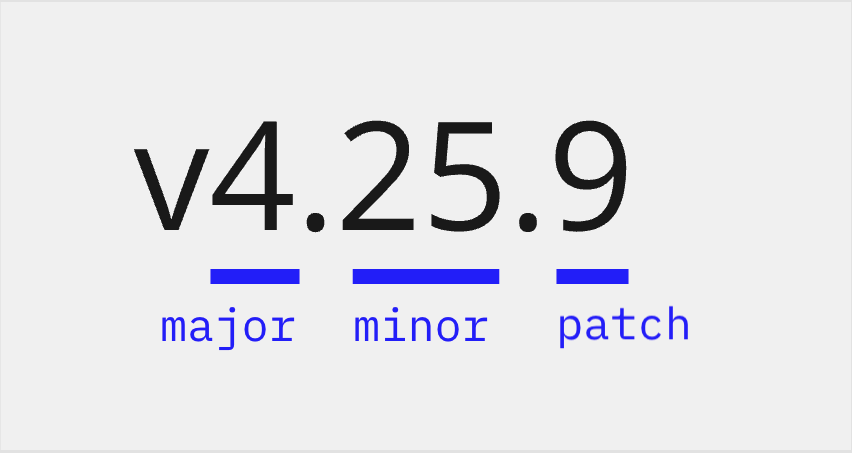
- The first number is the major version number.
- The second number is the minor version number.
- The third number is the patch version number.
The upgrade tool allows upgrading to a major, minor, or patch version.
What the upgrade tool does depends on the latest existing version and the command you run.
For instance, if the latest Strapi v4 version is v4.25.9:
| My Strapi application is currently on… | If I run… | My Strapi application will be upgraded to … |
|---|---|---|
| v4.25.1 | npx @strapi/upgrade patch | v4.25.9 (because v4.25.9 is the latest patch version for the v4.25 minor version) |
| v4.14.1 | npx @strapi/upgrade minor | v4.25.9 |
| v4.14.1 | npx @strapi/upgrade major | Nothing. I first need to run npx @strapi/upgrade minor to upgrade to v4.25.9. |
| v4.25.9 | npx @strapi/upgrade major | v5.0.0 |
| v4.14.1 | npx @strapi/upgrade latest | v5.1.2 A confirmation prompt appears to make sure the major version bump is intended. |
Upgrade to a new version
Before running the upgrade process, make sure you've created a backup of your codebase and database.
Upgrade to a major version
Run the upgrade tool with the major parameter to upgrade the project to the next major version of Strapi:
npx @strapi/upgrade major
During the upgrade process, the application dependencies are updated and installed, and the related codemods are executed.
If your application is not already running the latest minor and patch version in the current major, the major upgrade is prevented, and you will first need to upgrade to the latest minor.patch version in the current major version. This means that moving from v4.14.4 to v5.0.0 is a 2-step process because the latest v4 version is v4.16.2.
Upgrade to a minor version
Run the upgrade tool with the minor parameter to upgrade the project to the latest minor and patch version of Strapi:
npx @strapi/upgrade minor
During the upgrade process, the project dependencies are updated and installed, and the related codemods are executed (if any).
Upgrade to a patch version
Run the upgrade tool with the patch parameter to upgrade the project to the latest patch version in the current minor and major version of Strapi:
npx @strapi/upgrade patch
During the upgrade process, the project dependencies are updated and installed, and the related codemods are executed (if any).
Upgrade to the latest version
Run the upgrade tool with the latest parameter to upgrade the project to the latest available version regardless of the current Strapi version:
npx @strapi/upgrade latest
During the upgrade process, the project dependencies are updated and installed, and the related codemods are executed (if any).
If a major version upgrade is detected, the upgrade tool displays a confirmation prompt to make sure the change is
intended.
In the scenario where the major bump isn't the desired option, see the minor upgrade.
Upgrade to a specific version
Run the upgrade tool with the to parameter followed by a target version to upgrade the project to that specific published version of Strapi:
npx @strapi/upgrade to 5.42.0
Use to when latest resolves to a version blocked by your registry policies. For example, your .npmrc might set a min-release-age (a delay before newly published versions can be installed) to mitigate supply-chain risks. In that case, the latest published version is not yet installable, so you can target an older version instead.
For pre-releases, pass the --codemods-target option to select which set of codemods to run. It defaults to the major.minor.patch portion of the target version:
npx @strapi/upgrade to 5.0.0-beta.951 --codemods-target 5.0.0
The to command skips the safety check that requires the project to be on the latest patch of its current major version before a major upgrade. It is intended for users who know which version they want to target.
Run codemods only
Run the upgrade tool with the codemods parameter to execute a utility that allows selecting the codemods to be executed. With this command, only the codemods are run, the dependencies are not updated nor installed.
To view a list of the available codemods, use the ls command:
npx @strapi/upgrade codemods ls
To select from a list of available codemods and run them, use the run command:
npx @strapi/upgrade codemods run
To run only a specific codemod, use run followed by a UID found from the ls command:
npx @strapi/upgrade codemods run 5.0.0-strapi-codemod-uid
Options
The npx @strapi/upgrade [major|minor|patch] commands can accept the following options:
| Option | Description | Default |
|---|---|---|
-n, --dry | Simulate the upgrade without updating any files | false |
-d, --debug | Get more logs in debug mode | false |
-s, --silent | Don't log anything | false |
-p, --project-path <project-path> | Path to the Strapi project | - |
-y, --yes | Automatically answer "yes" to every prompt | false |
The following options can be run either with the npx @strapi/upgrade command alone or with the npx @strapi/upgrade [major|minor|patch] commands:
| Option | Description |
|---|---|
-V, --version | Output the version number |
-h, --help | Print command line options |
Simulate the upgrade without updating any files (dry run)
When passing the -n or --dry option, the codemods are executed without actually editing the files. The package.json will not be modified, and the dependencies will not be re-installed. Using this option allows simulating the upgrade of the codebase, checking the outcomes without applying any changes:
Examples:
npx @strapi/upgrade major --dry
npx @strapi/upgrade minor --dry
npx @strapi/upgrade patch --dry
Select a path for the Strapi application folder
When passing the -p or --project-path option followed by a valid path you can specify in which folder the Strapi application is located.
Example:
npx @strapi/upgrade major -p /path/to/the/Strapi/application/folder
Get the current version
When passing the --version option (or its -V shorthand), the current version of the upgrade tool is logged.
Example:
$ npx @strapi/upgrade -V
4.15.1
Get detailed debugging information
When passing the --debug option (or its -d shorthand), the upgrade tool provides more detailed logs while running:
npx @strapi/upgrade --debug
Execute the upgrade silently
When passing the --silent option (or its -s shorthand), the tool executes the upgrade without providing any log:
npx @strapi/upgrade --silent
Answer yes to every prompt
When passing the --yes option (or its -y shorthand), the tool automatically answers "yes" to every prompt:
npx @strapi/upgrade --yes`
Get help
When passing the --help option (or its -h shorthand), help information is displayed, listing the available options:
Examples:
- General help for the upgrade tool
- Specific help for upgrade major
$ npx @strapi/upgrade -h
Usage: upgrade <command> [options]

Options:
 -V, --version    output the version number
 -h, --help       Print command line options

Commands:
 latest [options]  Upgrade to the latest available version of Strapi
 major [options]   Upgrade to the next available major version of Strapi
 minor [options]   Upgrade to ...
 patch [options]   Upgrade to ...
to [options] <target> Upgrade to a specific version of Strapi
 help [command]    Print options for a specific command
$ npx @strapi/upgrade major -h
Usage: upgrade major [options]

Upgrade to the next available major version of Strapi

Options:
  -p, --project-path <project-path>  Path to the Strapi project
  -n, --dry                          Simulate the upgrade without updating any files (default: false)
  -d, --debug                        Get more logs in debug mode (default: false)
  -s, --silent                       Don't log anything (default: false)
  -h, --help                         Display help for command
  -y, --yes                          Automatically answer yes to every prompt